



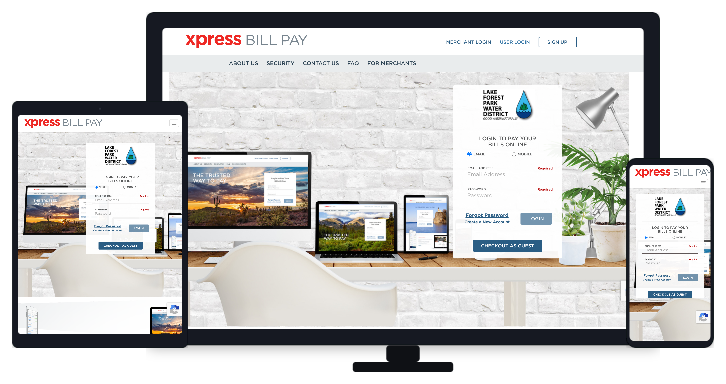
In the interest of serving you better, we have partnered with Xpress BILL PAY to manage online payments. You now have the option to pay via credit/debit card (Visa, Mastercard), or eCheck using the new online portal. We aren’t removing any payment methods, so you are still welcome to pay with cash, check or your bank’s electronic billpay service.
A great advantage of this service is that you can use the Auto Pay feature, which allows the balance on your bill to automatically be paid using the payment methods of your choice,
SETUP YOUR BILLPAY ACCOUNT
- Create account – You will first need to create an account at Xpress Bill Pay (instructions HERE),
- Bill Notifications – When your account is established, you will receive an email notification when your bill is ready. To pay your bill log into your Xpress Bill Pay account, select a payment type, enter the information and hit send.
- Auto Pay – You can setup your account with Auto Pay using your prefered payment method.
- Guest Checkout – The guest checkout option allows a payment to be made without creating an account.
- View Statements – Creating an account will make it easy to view your usage and compare with the last two years.
- Mobile Device – Pay your bill from your portable device using Android or iOS app.
- Restrictions – Please note that for security reasons you will only have access to Xpress Bill Pay in the USA and Canada, if you are outside these countries, please make arrangements if you need to access your account.
Xpress Billpay for iOS
GO PAPERLESS
- About Billing – Bills are sent at the beginning of every odd numbered month, and the balance is due at the end of that month. More about your bill here.
- Paperless – Paperless options are managed in your Xpress Bill Pay account. If you have been receiving your bills by email, you will need to re-register your preference for paperless bills by turning the “Paperless” toggle to green.

Xpress Billpay for Android
RECEIVING YOUR BILL
- Online – Xpress Bill Pay offers our customers free and secure access to account information, including usage history, past and current utility bills, online payment options and more. Simply create an account at Xpress Bill Pay to begin. When bills are ready for viewing, you’ll receive an e-mail notification with a link to view your password-protected account information.
- Mail – we will mail printed bills to customers who have not yet opted for paperless. For your convenience, mailed bills will continue to include a pre-addressed return envelope for payment.
PAYING YOUR BILL
Regardless of whether you choose to receive utility bills online or through the mail, you still have a number of payment methods available to you.
- Online – (Checking / Savings Account) – Utility bills can be paid directly from your checking or savings account through your bank’s free billpay service.
- Online – (Xpress Bill Pay) – You can use eCheck, Visa, Mastercard, manual payments or Auto Pay.
- Online – (Credit / Debit Card) – Credit and Debit card payments can be made through your Xpress Bill Pay account and entering your card information.
- In Person – (Check, Cash, Card) – Our office is open Monday through Friday from 8:00 a.m. to 4:30 p.m. For your convenience, a secure drop-box is also located just outside our gate. Please be sure to include your utility bill stub along with your payment. You may pay by card in person during regular business hours.
- Mail (Check) – Please mail your utility bill stub with your payment to: 4029 NE 178th St., Lake Forest Park, WA 98155

Q & A ABOUT ONLINE BILL PAYMENT
Q: Does it cost anything to sign up for online payments?
A: No. It’s free to sign up for online bill payment and to use the Xpress Bill Pay service. Some organizations charge a transaction convenience fee, but at this time LFPWD does not.
Q: What is Xpress Bill Pay?
A: Xpress Bill Pay is the company we have partnered with to handle our online payments. You access your account from their website, xpressbillpay.com.
Q: What payment choices do I have?
A: You can pay with a credit or debit card or transfer funds directly from your checking account (aka eCheck).
Q: What will my bill look like online?
A: We try to make the online bill display similar to your paper statement so you’ll find it easy to read your bill on a screen.
Q: What other information is available?
A: You can view up to two years’ history of your account online, so you can compare your current bill to a previous bill.
Q: Do I need to pay my bills from my computer?
A: Not at all. You can pay your bill from just about anywhere via computer or mobile device. All you need is access to the internet through a web browser. You then log in to your account using your email address and password or sign in using our mobile app. No need to worry about late payments if you’re out of town when your bill is due. (only in USA and Canada)
Q: How do I know the payment went through?
A: After you complete the transaction, you can receive an email receipt to confirm that your payment went through.
Q: Is my information safe?
A: Absolutely. All the transactions are handled on secure servers. As long as you don’t give out your password, only you will be able to access your account. Plus, your personal information or email address will not be sold or rented to third parties for marketing purposes without your permission.